摘要
APK检测:
1
2
3
4
5
6
7
8
9
10
11
12
13
14
15
16
17
18
19
20
21
22
23
24
25
26
27
28
29
30
31
32
33
34
35
36
37
38
39
40
41
42
43
44
45
46
47
48
49
50
51
52
53
54
55
56
57
58
59
60
61
62
63
64
65
66
67
68
69
70
71
72
73
74
75
76
77
78
79
80
81
82
83
84
85
86
87
88
89
90
91
92
93
94
95
96
97
98
99
100
101
102
103
104
105
106
107
108
109
110
111
112
113
114
115
116
117
118
119
120
121
122
123
124
125
126
127
128
129
130
131
132
133
134
135
136
137
138
139
140
141
142
143
144
145
146
147
148
149
150
151
152
153
154
155
156
157
158
159
160
161
162
163
164
165
166
167
168
169
170
171
172
173
174
175
176
177
178
179
180
181
182
183
184
185
186
187
188
189
190
191
192
193
194
195
196
197
198
199
200
201
202
203
204
205
206
207
208
209
210
211
212
213
214
215
216
217
218
219
220
221
222
223
224
225
226
227
228
229
230
231
232
233
234
235
236
237
238
239
240
241
242
243
244
APK检测工具 - 扫描配置: - 文件路径: /Users/lianfeiyang/Downloads/ximalaya_app.apk - 检测类型: ROOT(true) 模拟器(true) 反调试(true) 代理(true) SDK(true) 硬编码(false) 证书(true) - 最大文件大小: 500 MB - 递归扫描: true --------------------------------------------------- 正在扫描APK文件: /Users/lianfeiyang/Downloads/ximalaya_app.apk ===================== 加固特征扫描结果 ===================== 未发现加固特征 ===================== 安全检测特征扫描结果 ===================== [ROOT检测特征] classes9.dex -> /system/xbin/ (常见Root工具目录(分段检测)) classes9.dex -> /vendor/bin/ (厂商Root工具目录(分段检测)) classes8.dex -> /data/local/bin/su (SU二进制文件常见路径) classes8.dex -> /data/local/su (SU二进制备用路径) classes8.dex -> /data/local/xbin/su (Xposed框架SU路径) classes8.dex -> /sbin/su (系统分区SU文件) classes8.dex -> /su/bin/su (Systemless SU路径) classes8.dex -> /system/app/Superuser.apk (Superuser安装包) classes8.dex -> /system/bin/failsafe/su (故障安全模式SU) classes8.dex -> /system/bin/su (系统内置SU) classes8.dex -> /system/sd/xbin/su (SD卡扩展SU路径) classes8.dex -> /system/xbin/su (常见SU存放路径) classes8.dex -> Superuser.apk (Superuser安装包(分段检测)) classes8.dex -> /system/xbin/ (常见Root工具目录(分段检测)) classes8.dex -> /vendor/bin/ (厂商Root工具目录(分段检测)) classes11.dex -> /system/app/Superuser.apk (Superuser安装包) classes11.dex -> Superuser.apk (Superuser安装包(分段检测)) classes11.dex -> /system/xbin/ (常见Root工具目录(分段检测)) classes11.dex -> com.koushikdutta.superuser (Koush's Superuser) classes11.dex -> com.noshufou.android.su (Superuser官方包名) classes11.dex -> com.thirdparty.superuser (第三方Superuser应用) classes11.dex -> eu.chainfire.supersu (Chainfire SuperSU) classes10.dex -> /data/local/bin/su (SU二进制文件常见路径) classes10.dex -> /data/local/su (SU二进制备用路径) classes10.dex -> /data/local/xbin/su (Xposed框架SU路径) classes10.dex -> /sbin/su (系统分区SU文件) classes10.dex -> /su/bin/su (Systemless SU路径) classes10.dex -> /system/app/Kinguser.apk (Kingroot安装包) classes10.dex -> /system/app/Superuser.apk (Superuser安装包) classes10.dex -> /system/bin/failsafe/su (故障安全模式SU) classes10.dex -> /system/bin/su (系统内置SU) classes10.dex -> /system/sd/xbin/su (SD卡扩展SU路径) classes10.dex -> /system/xbin/su (常见SU存放路径) classes10.dex -> Kinguser.apk (Kingroot安装包(分段检测)) classes10.dex -> Superuser.apk (Superuser安装包(分段检测)) classes10.dex -> /system/xbin/ (常见Root工具目录(分段检测)) classes10.dex -> /vendor/bin/ (厂商Root工具目录(分段检测)) classes.dex -> /data/local/bin/su (SU二进制文件常见路径) classes.dex -> /data/local/su (SU二进制备用路径) classes.dex -> /data/local/xbin/su (Xposed框架SU路径) classes.dex -> /sbin/su (系统分区SU文件) classes.dex -> /su/bin/su (Systemless SU路径) classes.dex -> /system/app/Superuser.apk (Superuser安装包) classes.dex -> /system/bin/failsafe/su (故障安全模式SU) classes.dex -> /system/bin/su (系统内置SU) classes.dex -> /system/sd/xbin/su (SD卡扩展SU路径) classes.dex -> /system/xbin/daemonsu (SuperSU守护进程) classes.dex -> /system/xbin/su (常见SU存放路径) classes.dex -> Superuser.apk (Superuser安装包(分段检测)) classes.dex -> /system/xbin/ (常见Root工具目录(分段检测)) classes.dex -> /vendor/bin/ (厂商Root工具目录(分段检测)) classes.dex -> com.koushikdutta.superuser (Koush's Superuser) classes.dex -> com.noshufou.android.su (Superuser官方包名) classes.dex -> com.thirdparty.superuser (第三方Superuser应用) classes.dex -> eu.chainfire.supersu (Chainfire SuperSU) classes6.dex -> /system/app/Superuser.apk (Superuser安装包) classes6.dex -> Superuser.apk (Superuser安装包(分段检测)) classes6.dex -> /system/xbin/ (常见Root工具目录(分段检测)) classes6.dex -> com.koushikdutta.superuser (Koush's Superuser) classes6.dex -> com.noshufou.android.su (Superuser官方包名) classes6.dex -> com.thirdparty.superuser (第三方Superuser应用) classes6.dex -> eu.chainfire.supersu (Chainfire SuperSU) classes6.dex -> de.robv.android.xposed.installer (Xposed安装器) [模拟器检测特征] classes9.dex -> test-keys (测试版系统特征) classes9.dex -> goldfish (Android模拟器内核标识) classes9.dex -> generic_x86 (模拟器常见ABI) classes9.dex -> emulator (模拟器标识) classes9.dex -> eth0 (模拟器网络接口) classes8.dex -> test-keys (测试版系统特征) classes8.dex -> goldfish (Android模拟器内核标识) classes8.dex -> 000000000000000 (模拟器默认IMEI) classes8.dex -> /dev/socket/qemud (QEMU守护进程socket) classes8.dex -> /dev/qemu_pipe (QEMU管道通信接口) classes8.dex -> ro.kernel.qemu (QEMU内核属性标识) classes8.dex -> eth0 (模拟器网络接口) classes11.dex -> tel:123456 (模拟器默认电话号码) classes11.dex -> test-keys (测试版系统特征) classes11.dex -> goldfish (Android模拟器内核标识) classes10.dex -> test-keys (测试版系统特征) classes10.dex -> goldfish (Android模拟器内核标识) classes10.dex -> 000000000000000 (模拟器默认IMEI) classes10.dex -> /dev/socket/qemud (QEMU守护进程socket) classes10.dex -> /dev/qemu_pipe (QEMU管道通信接口) classes10.dex -> emulator (模拟器标识) classes.dex -> test-keys (测试版系统特征) classes.dex -> goldfish (Android模拟器内核标识) classes.dex -> 000000000000000 (模拟器默认IMEI) classes.dex -> /dev/socket/qemud (QEMU守护进程socket) classes.dex -> /dev/qemu_pipe (QEMU管道通信接口) classes.dex -> ro.kernel.qemu (QEMU内核属性标识) classes.dex -> emulator (模拟器标识) classes.dex -> 10.0.2.15 (默认NAT网关IP) classes.dex -> eth0 (模拟器网络接口) classes6.dex -> tel:123456 (模拟器默认电话号码) classes6.dex -> test-keys (测试版系统特征) classes6.dex -> goldfish (Android模拟器内核标识) classes6.dex -> 000000000000000 (模拟器默认IMEI) classes6.dex -> /dev/socket/qemud (QEMU守护进程socket) classes6.dex -> /dev/qemu_pipe (QEMU管道通信接口) classes6.dex -> ro.kernel.qemu (QEMU内核属性标识) classes6.dex -> eth0 (模拟器网络接口) classes5.dex -> 000000000000000 (模拟器默认IMEI) [反调试检测特征] classes11.dex -> com.android.internal.os.ZygoteInit (Zygote初始化检测) classes11.dex -> com.saurik.substrate.MS$2 (Substrate框架检测) classes11.dex -> de.robv.android.xposed.XposedBridge (Xposed框架检测) classes11.dex -> XposedBridge.jar (Xposed桥接文件检测) classes11.dex -> ro.debuggable (系统调试属性检测) classes11.dex -> com.saurik.substrate (Substrate框架检测) classes10.dex -> com.android.internal.os.ZygoteInit (Zygote初始化检测) classes10.dex -> com.saurik.substrate.MS$2 (Substrate框架检测) classes10.dex -> de.robv.android.xposed.XposedBridge (Xposed框架检测) classes10.dex -> XposedBridge.jar (Xposed桥接文件检测) classes10.dex -> ptrace (Ptrace调试检测) classes10.dex -> /proc/self/status (TracerPid状态检测) classes10.dex -> com.saurik.substrate (Substrate框架检测) classes.dex -> com.android.internal.os.ZygoteInit (Zygote初始化检测) classes.dex -> com.saurik.substrate.MS$2 (Substrate框架检测) classes.dex -> de.robv.android.xposed.XposedBridge (Xposed框架检测) classes.dex -> XposedBridge.jar (Xposed桥接文件检测) classes.dex -> com.saurik.substrate (Substrate框架检测) classes6.dex -> com.android.internal.os.ZygoteInit (Zygote初始化检测) classes6.dex -> com.saurik.substrate.MS$2 (Substrate框架检测) classes6.dex -> de.robv.android.xposed.XposedBridge (Xposed框架检测) classes6.dex -> XposedBridge.jar (Xposed桥接文件检测) classes6.dex -> ro.debuggable (系统调试属性检测) classes6.dex -> com.saurik.substrate (Substrate框架检测) [代理检测特征] classes9.dex -> Ljavax/net/ssl/X509TrustManager; (自定义证书信任管理器) classes8.dex -> Ljavax/net/ssl/X509TrustManager; (自定义证书信任管理器) classes11.dex -> Ljavax/net/ssl/X509TrustManager; (自定义证书信任管理器) classes10.dex -> Ljavax/net/ssl/X509TrustManager; (自定义证书信任管理器) classes13.dex -> Lokhttp3/internal/proxy/NullProxySelector; (OkHttp空代理选择器) classes13.dex -> Ljavax/net/ssl/X509TrustManager; (自定义证书信任管理器) classes.dex -> Ljavax/net/ssl/X509TrustManager; (自定义证书信任管理器) classes6.dex -> Ljavax/net/ssl/X509TrustManager; (自定义证书信任管理器) classes7.dex -> Lokhttp3/internal/proxy/NullProxySelector; (OkHttp空代理选择器) classes7.dex -> Ljavax/net/ssl/X509TrustManager; (自定义证书信任管理器) classes5.dex -> Ljavax/net/ssl/X509TrustManager; (自定义证书信任管理器) classes5.dex -> VPNService (VPN服务检测) ===================== 第三方SDK特征扫描结果 ===================== [Alibaba] 岳鹰全景监控 -> lib/arm64-v8a/libcrashsdk.so [Android] C++ 共享库 -> lib/arm64-v8a/libc++_shared.so FrameSequence -> lib/arm64-v8a/libframesequence.so [Bilibili] IJKPlayer -> lib/arm64-v8a/libijkffmpeg.so IJKPlayer -> lib/arm64-v8a/libijkplayer.so IJKPlayer -> lib/arm64-v8a/libijksdl.so [ByteDance] BHook -> lib/arm64-v8a/libbytehook.so Pangle SDK -> lib/arm64-v8a/libpangleflipped.so Pangle SDK -> lib/arm64-v8a/libtobEmbedEncrypt.so [Facebook] Facebook SDK -> lib/arm64-v8a/libfb.so Facebook SDK -> lib/arm64-v8a/libfbjni.so Folly -> lib/arm64-v8a/libfolly_futures.so Folly -> lib/arm64-v8a/libfolly_json.so Fresco -> lib/arm64-v8a/libimagepipeline.so Fresco -> lib/arm64-v8a/libnative-filters.so Fresco -> lib/arm64-v8a/libnative-imagetranscoder.so Hermes JS Engine -> lib/arm64-v8a/libhermes-executor-debug.so Hermes JS Engine -> lib/arm64-v8a/libhermes-executor-release.so Hermes JS Engine -> lib/arm64-v8a/libhermes-inspector.so Hermes JS Engine -> lib/arm64-v8a/libhermes.so React Native -> lib/arm64-v8a/libglog_init.so React Native -> lib/arm64-v8a/libjsc.so React Native -> lib/arm64-v8a/libjscexecutor.so React Native -> lib/arm64-v8a/libjsijniprofiler.so React Native -> lib/arm64-v8a/libjsinspector.so React Native -> lib/arm64-v8a/libreactnativeblob.so React Native -> lib/arm64-v8a/libreactnativejni.so Yoga -> lib/arm64-v8a/libyoga.so [GIFLIB] GIFLIB -> lib/arm64-v8a/libgifimage.so [Google] glog -> lib/arm64-v8a/libglog.so [Tencent] Bugly -> lib/arm64-v8a/libBugly_Native.so MMKV -> lib/arm64-v8a/libmmkv.so Mars -> lib/arm64-v8a/libmarsxlog.so [Weibo] 微博 SDK -> lib/arm64-v8a/libweibosdkcore.so 微博 SDK -> lib/arm64-v8a/libwind.so [Yalantis] uCrop -> lib/arm64-v8a/libucrop.so [北京数字联盟网络科技有限公司] 数字联盟可信 ID SDK -> lib/arm64-v8a/libdu.so [极光] 极光认证 SDK -> lib/arm64-v8a/libCtaApiLib.so [移动安全联盟] MSA SDK -> lib/arm64-v8a/libmsaoaidauth.so MSA SDK -> lib/arm64-v8a/libmsaoaidsec.so [银联] 银联 SDK -> lib/arm64-v8a/libentryexpro.so ===================== 证书扫描结果 ===================== [证书文件: assets/com.ximalaya.ting.android.cert.pem] 主题: CN=com.ximalaya.ting.android,O=ximalaya,L=Beijing,ST=Beijing,C=CN,1.2.840.113549.1.9.1=#0c136c652e78696e4078696d616c6179612e636f6d 发行者: CN=com.bun.miitmdid.sign,OU=OAID_SDK,O=MSA,ST=Beijing,C=CN,1.2.840.113549.1.9.1=#0c0f6d73614063616963742e61632e636e 序列号: BB36 有效期: 2024-05-29 17:39:10 至 2025-05-30 17:39:10 签名算法: SHA256-RSA SHA1指纹: 密钥用途: [证书文件: META-INF/CERT.RSA] 解析证书失败: x509: malformed tbs certificate
adb shell getprop ro.debuggable这样就是可调试
MainActivity 喜马拉雅 Android 应用 MainActivity 类的反编译版本。该类是应用的主入口,负责初始化、UI 搭建、导航与用户交互等核心功能。
一、初始化与搭建
初始化各管理器:ManageFragment(Fragment 管理)、PlayerManager(音频播放)、BottomTabManager(底部导航)。
实例化底部 RadioButton 并绑定切换事件。
启动推送、播放、登录等后台服务。
二、Fragment 管理
借助 ManageFragment 完成 Fragment 的 add/show/hide/remove 及生命周期管理。
提供 startFragment/showFragment/hideFragment 等统一入口,实现平滑转场与参数传递。
三、底部导航
底部共有 4 个 Tab:首页、发现、我听、VIP(或“分类”,由 A/B 决定)。
onCheckedChanged 中根据选中 id 切换对应 Fragment,同时更新顶部标题与埋点。
四、播放控制
PlayBarFragment 负责迷你播放条。
showPlayFragment/hidePlayFragment 依据播放状态动态显隐,并联动底部导航高度。
五、用户交互
集中处理 Tab 点击、菜单按钮、深度链接、Push 唤起、活动弹窗等事件。
对夜间模式、青少年模式、登录态做实时校验。
六、A/B 测试与配置
通过 ConfigManager 拉取线上配置,决定“快听”入口、小说频道是否展示。
实验参数变化时,即时刷新底部导航顺序与图标。
七、生命周期
onCreate:异步初始化,防止阻塞主线程;同时注册各类全局广播与观察者。
onResume:刷新未读数、续播进度、检查版本更新。
onBackPressed:优先消费 Fragment 返回栈;若无,则处理双击退出或弹窗。
onDestroy:反注册、释放播放器、停止后台服务,防止泄漏。
八、关键方法说明
initAll():界面绘制完成后,再真正加载耗时组件(Fragment、广告 SDK、推荐接口)。
checkRadio():根据保存的 SP 或外部 Scheme,恢复上次所在的 Tab。
handleDeepLink()/handlePushIntent():统一分发外部唤起,跳转到对应播放页或活动页。
九、异常与日志
统一使用内部 Logger,按模块输出到文件与控制台,便于线上排查。
对 SDK 初始化、播放器内核、网络库设置默认未捕获异常处理器,降低 crash 率。
十、性能优化
Fragment 懒加载:仅当第一次可见时才请求数据。
图片、音频资源采用内存+磁盘二级缓存,并在 onTrimMemory 时主动释放。
后台任务统一进入 AppExecutors,避免频繁创建线程。
十一、安全与合规
登录态加密存储于 AccountManager,自动刷新 token。
青少年模式下屏蔽付费、直播、社区等入口,并限制播放时长。
隐私弹窗与权限申请遵循“最小可用”原则,先检查后请求。
总结
AuthManager类整体架构 com.ximalaya.aiagentconnect.sdk.connection.auth.AuthManager:AuthManager
负责“注册成功以后怎么拿 token”
登录 1 2 @Override // com.ximalaya.aiagentconnect.sdk.connection.auth.IAuthManager public String a() {
1 2 3 4 5 6 7 8 9 int i = d.f26532a[mainAPPInfo.getLoginType().ordinal()]; if (i == 1 ) { tokenB = b(mainAPPInfo.getAppVersion(), mainAPPInfo.getUid(), mainAPPInfo.getDeviceID(), mainAPPInfo.getProductID(), mainAPPInfo.getProductSecret(), mainAPPInfo.getToken(), mainAPPInfo.getServerVersion()); } else { if (i != 2 ) { throw new NoWhenBranchMatchedException (); } tokenB = a(mainAPPInfo.getAppVersion(), mainAPPInfo.getDeviceID(), mainAPPInfo.getProductID(), mainAPPInfo.getProductSecret(), mainAPPInfo.getServerVersion()); }
用户登录
1 2 3 4 5 6 7 8 9 10 11 12 13 14 15 16 17 18 19 private final Token b (String str, String str2, String str3, String str4, String str5, String str6, String str7) { a("开始用户登录" ); ResponseData responseDataA = a("/xmly-login" , an.b(s.a("app_version" , str), s.a("product_id" , str4), s.a("device_id" , str3), s.a("request_id" , UUID.randomUUID().toString()), s.a("device_type" , "2" ), s.a("timestamp" , String.valueOf(System.currentTimeMillis())), s.a("sys_type" , "1" ), s.a("sys_version" , String.valueOf(Build.VERSION.SDK_INT)), s.a("server_version" , str7)), an.a(s.a("Cookie" , "1&_token=" + str2 + '&' + str6)), str5); String strM5514getOs_access_token = responseDataA != null ? responseDataA.m5514getOs_access_token() : null ; String strM5517getOs_refresh_token = responseDataA != null ? responseDataA.m5517getOs_refresh_token() : null ; String str8 = strM5514getOs_access_token; if (!(str8 == null || o.a((CharSequence) str8))) { String str9 = strM5517getOs_refresh_token; if (!(str9 == null || o.a((CharSequence) str9))) { long jM5515getOs_expires_in = responseDataA.m5515getOs_expires_in() * 1000 ; this .g = true ; a("用户登录成功,有效期:" + jM5515getOs_expires_in); return new Token (strM5514getOs_access_token, strM5517getOs_refresh_token, SystemClock.elapsedRealtime(), jM5515getOs_expires_in); } } a("用户登录失败" ); this .g = false ; return (Token) null ; }
1. 核心类结构 1 2 3 4 5 6 7 8 9 10 11 12 13 public final class AuthManager implements IAuthManager { // 主要字段 private MainAPPInfo mainAppInfo; // 应用信息 private Token token; // 当前令牌 private boolean g; // 认证状态标志 private IAuthTokenListener h; // 令牌监听器 // 登录类型枚举 private enum LoginType { USER, // 用户登录 GUEST // 访客登录 } }
2. Token类结构 1 2 3 4 5 6 7 private static final class Token { private final String accessToken; // 访问令牌 private final String refreshToken; // 刷新令牌 private final long birthTime; // 令牌创建时间 private final long expireIn; // 令牌有效期(毫秒) }
登录逻辑详细分析 1. 主登录入口方法 a() 1 2 3 4 5 6 7 8 9 10 11 12 13 14 15 16 17 18 19 20 21 22 23 24 25 26 27 28 29 30 31 32 33 34 35 36 37 38 39 40 41 42 43 44 45 46 47 public String a () { MainAPPInfo mainAPPInfo = this .mainAppInfo; if (mainAPPInfo == null ) { return null ; } Token token = this .token; if (token != null ) { if (!a(token)) { return token.getAccessToken(); } else { Token tokenA = token.getRefreshToken() == null ? a(mainAPPInfo.getAppVersion(), mainAPPInfo.getDeviceID(), mainAPPInfo.getProductID(), mainAPPInfo.getProductSecret(), mainAPPInfo.getServerVersion()) : b(token.getAccessToken(), token.getRefreshToken(), mainAPPInfo.getProductID(), mainAPPInfo.getProductSecret(), mainAPPInfo.getServerVersion()); if (tokenA != null ) { this .token = tokenA; return tokenA.getAccessToken(); } return null ; } } int i = d.f26532a[mainAPPInfo.getLoginType().ordinal()]; if (i == 1 ) { tokenB = b(mainAPPInfo.getAppVersion(), mainAPPInfo.getUid(), mainAPPInfo.getDeviceID(), mainAPPInfo.getProductID(), mainAPPInfo.getProductSecret(), mainAPPInfo.getToken(), mainAPPInfo.getServerVersion()); } else { tokenB = a(mainAPPInfo.getAppVersion(), mainAPPInfo.getDeviceID(), mainAPPInfo.getProductID(), mainAPPInfo.getProductSecret(), mainAPPInfo.getServerVersion()); } if (tokenB != null ) { this .token = tokenB; } return tokenB != null ? tokenB.getAccessToken() : null ; }
访客登录逻辑 a(String, String, String, String, String)
1 2 3 4 5 6 7 8 9 10 11 12 13 14 private final Token a (String str, String str2, String str3, String str4, String str5) { a("访客登陆" ); ResponseData responseDataA = a("/guest-login" , an.b(s.a("product_id" , str3), s.a("device_id" , str2), s.a("request_id" , UUID.randomUUID().toString()), s.a("timestamp" , String.valueOf(System.currentTimeMillis())), s.a("device_type" , "2" ), s.a("app_version" , str), s.a("sys_type" , "1" ), s.a("sys_version" , String.valueOf(Build.VERSION.SDK_INT)), s.a("server_version" , str5)), null , str4); String strM5514getOs_access_token = responseDataA != null ? responseDataA.m5514getOs_access_token() : null ; String str6 = strM5514getOs_access_token; if (str6 == null || o.a((CharSequence) str6)) { a("访客登录失败" ); this .g = false ; return (Token) null ; } this .g = true ; a("访客登录成功" ); return new Token (strM5514getOs_access_token, null , SystemClock.elapsedRealtime(), responseDataA.m5515getOs_expires_in() * 1000 ); }
3. 用户登录逻辑 b(String, String, String, String, String, String, String) 1 2 3 4 5 6 7 8 9 10 11 12 13 14 15 16 17 18 19 private final Token b (String str, String str2, String str3, String str4, String product_secret, String str5, String str6) { a("开始用户登录" ); ResponseData responseDataA = a("/xmly-login" , an.b(s.a("app_version" , str), s.a("product_id" , str4), s.a("device_id" , str3), s.a("request_id" , UUID.randomUUID().toString()), s.a("device_type" , "2" ), s.a("timestamp" , String.valueOf(System.currentTimeMillis())), s.a("sys_type" , "1" ), s.a("sys_version" , String.valueOf(Build.VERSION.SDK_INT)), s.a("server_version" , str6)), an.a(s.a("Cookie" , "1&_token=" + str2 + '&' + str5)), product_secret); String strM5514getOs_access_token = responseDataA != null ? responseDataA.m5514getOs_access_token() : null ; String strM5517getOs_refresh_token = responseDataA != null ? responseDataA.m5517getOs_refresh_token() : null ; String str7 = strM5514getOs_access_token; if (!(str7 == null || o.a((CharSequence) str7))) { String str8 = strM5517getOs_refresh_token; if (!(str8 == null || o.a((CharSequence) str8))) { long jM5515getOs_expires_in = responseDataA.m5515getOs_expires_in() * 1000 ; this .g = true ; a("用户登录成功,有效期:" + jM5515getOs_expires_in); return new Token (strM5514getOs_access_token, strM5517getOs_refresh_token, SystemClock.elapsedRealtime(), jM5515getOs_expires_in); } } a("用户登录失败" ); this .g = false ; return (Token) null ; }
4. 令牌刷新逻辑 b(String, String, String, String, String) 1 2 3 4 5 6 7 8 9 10 11 12 13 14 15 16 17 18 19 20 21 22 23 24 25 26 27 28 29 private final Token b (String accessToken, String refreshToken, String productID, String productSecret, String serverVersion) { a("开始刷新token" ); ResponseData responseDataA = a("/refresh-token" , an.b(s.a("os_refresh_token" , refreshToken), s.a("product_id" , productID), s.a("request_id" , UUID.randomUUID().toString()), s.a("timestamp" , String.valueOf(System.currentTimeMillis())), s.a("sys_type" , "1" ), s.a("sys_version" , String.valueOf(Build.VERSION.SDK_INT)), s.a("server_version" , serverVersion)), an.a(s.a("Authorization" , "Bearer " + accessToken)), productSecret); String newAccessToken = responseDataA != null ? responseDataA.m5514getOs_access_token() : null ; String newRefreshToken = responseDataA != null ? responseDataA.m5517getOs_refresh_token() : null ; if (newAccessToken != null && newRefreshToken != null ) { long expireIn = responseDataA.m5515getOs_expires_in() * 1000 ; this .g = true ; a("token刷新成功,有效期:" + expireIn); return new Token (newAccessToken, newRefreshToken, SystemClock.elapsedRealtime(), expireIn); } a("token刷新失败" ); this .g = false ; return null ; }
登录状态管理 1. 令牌过期检查 1 2 3 4 5 6 private final boolean a (Token token) { return SystemClock.elapsedRealtime() >= token.getBirthTime() + ((long ) kotlin.c.a.a((((float ) token.getExpireIn()) / 120.0f ) * 119.0f )); }
特点 :
使用SystemClock.elapsedRealtime()获取相对时间
提前1分钟判断令牌过期,避免过期时请求失败
过期时间计算:(总有效期 * 119/120)
2. 认证状态管理 1 2 3 4 5 6 7 8 9 private boolean g; // 认证状态标志 // 登录成功时 this.g = true; a("登录成功"); // 登录失败时 this.g = false; a("登录失败");
3. 应用信息管理 1 2 3 4 5 6 7 8 9 10 public final void a (String appVersion, String uid, String deviceID, String productID, String productSecret, String token, String serverVersion) { this .token = null ; String str8 = token; this .mainAppInfo = str8 == null || o.a((CharSequence) str8) ? new MainAPPInfo (LoginType.GUEST, appVersion, null , deviceID, productID, productSecret, null , serverVersion) : new MainAPPInfo (LoginType.USER, appVersion, uid, deviceID, productID, productSecret, token, serverVersion); }
网络请求和签名机制 1. 网络请求方法 1 2 3 4 5 6 7 8 9 10 11 12 13 14 15 16 17 18 19 20 21 22 23 24 25 26 27 28 29 30 31 32 33 34 35 36 37 38 39 40 41 42 43 44 45 46 47 private final ResponseData a (String path, Map<String, String> params, Map<String, String> headers, String productSecret) { HttpUrl.Builder builder = HttpUrl.get(this .f26519d + path).newBuilder(); SortedMap sortedMap = an.a(new Pair [0 ]); sortedMap.putAll(params); sortedMap.put("sig" , a(sortedMap, productSecret)); for (Map.Entry<String, ? extends Object > entry : sortedMap.entrySet()) { builder.addQueryParameter(entry.getKey(), (String) entry.getValue()); } Request.Builder builderPost = new Request .Builder() .url(builder.build()) .post(RequestBody.create((MediaType) null , "" )); if (headers != null ) { for (Map.Entry<String, String> entry : headers.entrySet()) { builderPost.addHeader(entry.getKey(), entry.getValue()); } } try { Response response = this .f26518c.newCall(builderPost.build()).execute(); ResponseBody body = response.body(); String responseBody = body != null ? body.string() : null ; if (this .h != null ) { this .h.a(responseBody); if (r.a((Object) authResponseBean.m5511getCode(), (Object) "2UC003" )) { this .h.b(responseBody); } } return authResponseBean != null ? authResponseBean.m5512getData() : null ; } catch (Exception e) { a(String.valueOf(e.getMessage())); return null ; } }
2. 签名机制 1 2 3 4 5 6 7 8 public final String a(Map<String, ? extends Object> hashMap, String productSecret) { StringBuffer stringBuffer = new StringBuffer(); for (String key : hashMap.keySet()) { stringBuffer.append(key + '=' + hashMap.get(key) + '&'); } stringBuffer.append("product_secret=" + productSecret); return MD5Util.f26576a.a(stringBuffer.toString()); }
product_secret的传递 com.ccbsdk.contact.SDKConfig中硬编码
1 public static final String cobp_prot7ecte1d = "android" ;
1 2 3 4 5 6 7 8 9 10 11 12 13 14 tokenB = b(mainAPPInfo.getAppVersion(), mainAPPInfo.getUid(), mainAPPInfo.getDeviceID(), mainAPPInfo.getProductID(), mainAPPInfo.getProductSecret(), mainAPPInfo.getToken(), mainAPPInfo.getServerVersion()); ⬇️ private final Token b(String str, String str2, String str3, String str4, String product_secret, String str5, String str6) { a("开始用户登录"); ResponseData responseDataA = a("/xmly-login", an.b(s.a("app_version", str), s.a("product_id", str4), s.a("device_id", str3), s.a("request_id", UUID.randomUUID().toString()), s.a("device_type", "2"), s.a("timestamp", String.valueOf(System.currentTimeMillis())), s.a("sys_type", "1"), s.a("sys_version", String.valueOf(Build.VERSION.SDK_INT)), s.a("server_version", str6)), an.a(s.a("Cookie", "1&_token=" + str2 + '&' + str5)), product_secret); ⬇️ private final ResponseData a(String str, Map<String, String> map, Map<String, String> map2, String product_secret) { IAuthTokenListener iAuthTokenListener; HttpUrl.Builder builderNewBuilder = HttpUrl.get(this.f26519d + str).newBuilder(); SortedMap sortedMapA = an.a(new Pair[0]); sortedMapA.putAll(map); SortedMap sortedMap = sortedMapA; sortedMap.put("sig", a(sortedMap, product_secret));
mainAPPInfo.getProductSecret()继续往前
创建mainAPPInfo实例
1 2 3 4 5 public final void a(String str, String str2, String str3, String str4, String str5, String str6, String str7) { this.token = null; String str8 = str6; this.mainAppInfo = str8 == null || o.a((CharSequence) str8) ? new MainAPPInfo(LoginType.GUEST, str, null, str3, str4, str5, null, str7) : new MainAPPInfo(LoginType.USER, str, str2, str3, str4, str5, str6, str7); }
往前
1 2 3 4 5 public final void a(String str, String str2, String str3, String str4, String str5, String str6, String str7) { this.token = null; String str8 = str6; this.mainAppInfo = str8 == null || o.a((CharSequence) str8) ? new MainAPPInfo(LoginType.GUEST, str, null, str3, str4, str5, null, str7) : new MainAPPInfo(LoginType.USER, str, str2, str3, str4, str5, str6, str7); }
但是没有搜索到调用public final void a(String str, String str2, String str3, String str4, String str5, String str6, String str7)的实例
很好!我找到了 AppConfig 类,它包含了 productSecret 字段。从代码中可以看到:
AppConfig 类有一个 productSecret 字段它有一个构造函数接受 productSecret 参数
还有一个合成的构造函数,其中有一行代码:(i2 & 128) != 0 ? SDKConfig.cobp_prot7ecte1d : str7
这表明 productSecret 可能是从 SDKConfig.cobp_prot7ecte1d 获取的,或者从构造函数的参数传入。
让我继续查看 XiaoYaConnectionConfig 类,看看它是如何使用 AppConfig 的。
1 2 3 public /* synthetic */ XiaoYaConnectionConfig(String str, String str2, String str3, String str4, String str5, String str6, String str7, int i, String str8, String str9, Integer num, boolean z, boolean z2, String str10, boolean z3, int i2, j jVar) { this(str, str2, str3, (i2 & 8) != 0 ? SDKConfig.cobp_prot7ecte1d : str4, str5, str6, str7, i, str8, (i2 & 512) != 0 ? "" : str9, (i2 & 1024) != 0 ? 2 : num, (i2 & 2048) != 0 ? false : z, (i2 & 4096) != 0 ? false : z2, (i2 & 8192) != 0 ? "TEXT" : str10, (i2 & 16384) != 0 ? false : z3); }
这里有一个关键的部分:(i2 & 8) != 0 ? SDKConfig.cobp_prot7ecte1d : str4
这意味着当 (i2 & 8) != 0 时,productSecret 会从 SDKConfig.cobp_prot7ecte1d 获取,而不是从构造函数参数传入。
让我查看 SDKConfig 类来了解 cobp_prot7ecte1d 是什么。
在 XiaoYaSDK 类中,我可以看到:
在 init 方法中:
1 XiaoYaSDK.f29134e = new AuthManager(config.getEnv(), false, 2, null);
在 setAccessToken 方法中:
1 authManager.a(appVersion, str, sn, productId, xiaoYaSDKConfig4 != null ? xiaoYaSDKConfig4.getProductSecret() : null, str2, "3");
这里可以看到 productSecret 是从 XiaoYaSDKConfig 中获取的,然后传递给 AuthManager 的 a 方法(即 setToken 方法)。
现在让我查看 XiaoYaSDKConfig 类,看看它是如何初始化的。
完整的传递链路 XmAgent里:appConfig.getProductSecret()获取,然后用来构造XiaoYaSDKConfig
1 2 3 4 5 6 7 8 9 10 11 public XmAgent (Context context, AppConfig appConfig, IPermissionRequest permissionRequest, com.ximalaya.aiagentconnect.sdk.connection.e.b bVar, IOpenPlatformParamsGetListener iOpenPlatformParamsGetListener, String str, Integer num, boolean z, RecordConfig recordConfig, RtcConfig rtcConfig, WebSocketConfig webSocketConfig, Location location, DebugConfig debugConfig, VUIAgentConfig vUIAgentConfig) { r.e(context, "context" ); r.e(appConfig, "appConfig" ); ... String productId = appConfig.getProductId(); String productSecret = appConfig.getProductSecret(); ... this .K = new XiaoYaSDKConfig (productId, productSecret, sn, null , strValueOf, appVersion, absolutePath, 1 , packageName == null ? "" : packageName, str == null ? "" : str, num != null ? num.intValue() : 1 , rtcConfig.getSendBySeiMode(), rtcConfig.getEnableAiNoise(), webSocketConfig.getChannelMode(), webSocketConfig.getOnlyServer(), 8 , null ); this .Q = new SimpleDateFormat ("yyyy-MM-dd HH:mm:ss" , Locale.getDefault()); this .R = new b (); }
第一层:XiaoYaSDKConfig i2相当于一个bitmap标志,每个bit代表是否传了实参,没传就用默认值
1 2 3 public XiaoYaSDKConfig(String str, String str2, String str3, String str4, String str5, String str6, String str7, int i, String str8, String str9, int i2, boolean z, boolean z2, String str10, boolean z3, int i3, j jVar) { this (str, str2, str3, (i3 & 8 ) != 0 ? SDKConfig.cobp_prot7ecte1d : str4, str5, str6, str7, i, str8, str9, (i3 & 1024 ) != 0 ? 2 : i2, (i3 & 2048 ) != 0 ? false : z, (i3 & 4096 ) != 0 ? false : z2, str10, (i3 & 16384 ) != 0 ? false : z3); }
当 (i3 & 8) != 0 时,使用 SDKConfig.cobp_prot7ecte1d
否则使用构造函数参数 str4
1 2 3 4 5 6 7 8 public XiaoYaSDKConfig (String str, String str2, String str3, String str4, String str5, String str6, String workDirPath, int i, String packageName, String httpHost, int i2, boolean z, boolean z2, String channelMode, boolean z3) { super (str, str2, str3, str4, str5, str6, workDirPath, i, packageName, httpHost, Integer.valueOf(i2), z, z2, channelMode, z3); r.e(workDirPath, "workDirPath" ); r.e(packageName, "packageName" ); r.e(httpHost, "httpHost" ); r.e(channelMode, "channelMode" ); }
第二层:XiaoYaConnectionConfig i2相当于一个bitmap标志,每个bit代表是否传了实参,没传就用默认值
1 2 3 public XiaoYaConnectionConfig(String str, String str2, String str3, String str4, String str5, String str6, String str7, int i, String str8, String str9, Integer num, boolean z, boolean z2, String str10, boolean z3, int i2, j jVar) { this (str, str2, str3, (i2 & 8 ) != 0 ? SDKConfig.cobp_prot7ecte1d : str4, str5, str6, str7, i, str8, (i2 & 512 ) != 0 ? "" : str9, (i2 & 1024 ) != 0 ? 2 : num, (i2 & 2048 ) != 0 ? false : z, (i2 & 4096 ) != 0 ? false : z2, (i2 & 8192 ) != 0 ? "TEXT" : str10, (i2 & 16384 ) != 0 ? false : z3); }
当 (i2 & 8) != 0 时,使用 SDKConfig.cobp_prot7ecte1d
否则使用构造函数参数 str4
还有一个传递方式convert2AppConfig:str4是AppConfig的product_secret,str4 = this.productSecret== null ? "" : this.productSecret;
1 2 3 4 5 6 7 8 9 10 11 12 13 14 15 16 public final AppConfig convert2AppConfig () { String str = this .productId; String str2 = str == null ? "" : str; String str3 = this .productSecret; String str4 = str3 == null ? "" : str3; String str5 = this .appVersion; String str6 = str5 == null ? "" : str5; String str7 = this .packageName; String str8 = this .sn; String str9 = str8 == null ? "" : str8; String str10 = this .osVersion; String str11 = str10 == null ? "" : str10; int i = this .env; String str12 = this .os; return new AppConfig (str2, str4, str6, str7, str9, str11, i, str12 == null ? "" : str12); }
调用:com.ximalaya.aiagentconnect.sdk.connection.network.WebSocketClient的
1 2 3 4 5 6 7 8 9 10 11 private final void a (boolean z) { m(); this .s = true ; if (this .t != null ) { d("waiting for reconnect" ); return ; } d("execute connect runnable " + this .f26587c + ' ' + z); this .f26589e.removeMessages(11 ); UrlManager.f26568a.a(this .f26587c, getF26578b().getF26504c().convert2AppConfig(), z, this .m > 0 , this .i); }
第三层:AppConfig 1 2 3 public AppConfig(String str, String str2, String str3, String str4, String str5, String str6, int i, String str7, int i2, j jVar) { this ((i2 & 1 ) != 0 ? "" : str, (i2 & 2 ) != 0 ? "" : str2, str3, str4, (i2 & 16 ) != 0 ? "" : str5, (i2 & 32 ) != 0 ? String.valueOf(Build.VERSION.SDK_INT) : str6, (i2 & 64 ) != 0 ? 1 : i, (i2 & 128 ) != 0 ? SDKConfig.cobp_prot7ecte1d : str7); }
当 (i2 & 128) != 0 时,使用 SDKConfig.cobp_prot7ecte1d
否则使用构造函数参数 str7
3. 调用链路 1 2 3 4 5 6 7 8 9 10 11 12 13 14 15 16 XiaoYaSDK.init() ↓ XiaoYaSDKConfig 构造 ↓ XiaoYaConnectionConfig 构造 ↓ AppConfig 构造 ↓ XiaoYaSDK.setAccessToken() ↓ AuthManager.setToken() (a方法) ↓ MainAPPInfo 构造 ↓ mainAPPInfo.getProductSecret()
条件判断机制
XiaoYaSDKConfig: (i3 & 8) != 0XiaoYaConnectionConfig: (i2 & 8) != 0AppConfig: (i2 & 128) != 0
这些条件判断决定了是否使用 SDKConfig.cobp_prot7ecte1d 作为 productSecret。
SDKConfig.cobp_prot7ecte1d 的性质:
从搜索结果看,SDKConfig.cobp_prot7ecte1d 是一个被混淆的静态值,可能是:
硬编码在 SDK 中的密钥
从资源文件或加密存储中读取的值
通过某种保护机制生成的动态值
风险:
静态密钥风险 : 如果 SDKConfig.cobp_prot7ecte1d 是静态硬编码的密钥,一旦被逆向工程获取,攻击者可以构造合法的 API 请求。混淆保护不足 : 虽然使用了混淆,但通过动态调试或内存dump仍可能获取该值。全局共享 : 同一个应用实例中,所有用户共享同一个 productSecret,增加了密钥泄露的风险。
风险 Token 三种登录场景(a() 方法总入口)
1 2 3 4 5 6 token == null ├─ LoginType.USER → b() 走“喜马拉雅用户登录” └─ LoginType.GUEST → a() 走“游客登录” token != null ├─ 未过期 → 直接返回 accessToken └─ 过期 → 用 refreshToken 调 b() 刷新
hook 点:
把 LoginType.USER 改成 GUEST 可强制游客通道;
把 a(Token) 的过期判断 return false 可永久不过期。
验证机制不严格
1 2 3 4 5 6 7 8 9 10 private final boolean a(Token token) { // 仅检查时间,不验证token有效性 return SystemClock.elapsedRealtime() >= token.getBirthTime() + ((long) kotlin.c.a.a((((float) token.getExpireIn()) / 120.0f) * 119.0f)); }
风险描述 :只检查本地时间计算,没有服务端验证,攻击者可能通过修改系统时间绕过过期检查
绕过方法 :
1 2 3 4 5 6 7 8 // 攻击者可以: 1. 修改设备系统时间,使token永不过期 2. 使用root权限修改elapsedRealtime返回值 3. Hook getToken()方法,直接返回有效token
token本地存储不安全
1 private Token token; // 仅内存存储,但可能被dump
风险 :内存中的token可能被恶意应用读取或dump
sig签名 机制1 sortedMap.put("sig", a(sortedMap, str2)); // 签名可被重放攻击
1 2 3 4 5 6 7 8 public final String a (Map<String, ? extends Object> hashMap, String productSecret) { StringBuffer stringBuffer = new StringBuffer (); for (String key : hashMap.keySet()) { stringBuffer.append(key + '=' + hashMap.get(key) + '&' ); } stringBuffer.append("product_secret=" + productSecret); return MD5Util.f26576a.a(stringBuffer.toString()); }
风险描述 :
使用MD5哈希,容易受到碰撞攻击
参数拼接顺序可能被预测
productSecret可能被逆向工程获取
篡改方法 :
1 2 3 4 5 6 7 8 9 10 11 12 13 14 // 1. 参数注入攻击 Map<String, String> params = new HashMap<>(); params.put("product_id", "malicious_product"); params.put("device_id", "hacked_device"); params.put("timestamp", " manipulated_timestamp"); params.put("sig", "crafted_md5_hash"); // 2. 中间人攻击拦截并修改请求数据
审计日志不完整: java
1 2 3 4 5 private final void a(String str) { if (this.g) { // 日志开关控制 XYLogger.f26497a.a("AuthManager", str); } }
日志输出有条件控制(this.g)
关键操作可能没有完整审计日志
数据泄露: 1 2 3 4 5 6 7 8 9 10 11 a("response:" + responseExecute.code() + ',' + strString); an.a(s.a("Cookie" , "1&_token=" + str2 + '&' + str6)) public static final String SERVER_ONLINE = "https://api.xiaoyastar.com/..." ;public static final String SERVER_TEST = "http://api.test.ximalaya.com/..." ;
API端点路径暴露(/guest-login, /xmly-login, /refresh-token)
认证失败原因可能暴露用户存在性
设备信息可能被收集
产品密钥硬编码
1 String productSecret; // 可能被逆向工程获取
潜在DoS问题: 1 2 3 4 5 6 7 8 try { Response responseExecute = this.f26518c.newCall(builderPost.build()).execute(); // 没有设置超时时间 // 同步执行可能阻塞线程 } catch (Exception e2) { a(String.valueOf(e2.getMessage())); return (ResponseData) null; }
无重试机制和限流
1 2 3 4 5 6 7 8 private final Token b(String appVersion, String uid, String deviceID, String productID, String productSecret, String token, String serverVersion) { // 没有重试次数限制 // 没有请求频率限制 // 可能被暴力破解或DDoS攻击 }
// 1. 暴力破解用户密码
// 2. 大量请求导致服务器资源耗尽
// 3. 刷新token请求轰炸
访客登录缺乏设备绑定 1 2 3 4 5 6 7 8 9 private final Token a(String appVersion, String deviceID, String productID, String productSecret, String serverVersion) { // 仅使用deviceID,但deviceID可能被伪造或篡改 // 没有设备指纹或硬件验证机制 }
我来分析GenAuthnHelper类并识别可能的STRIDE安全风险。首先让我获取这个类的源代码。
基于对GenAuthnHelper类的源代码分析,我来详细解释其功能并识别潜在的STRIDE安全风险:
AppConfig 1 com.ximalaya.aiagentconnect.sdk.connection.config.AppConfig
1 2 3 4 5 6 7 8 9 public final /* data */ class AppConfig { private final String appVersion; private final int env; private final String os; private final String osVersion; private final String packageName; private final String productId; private final String productSecret; private final String sn;
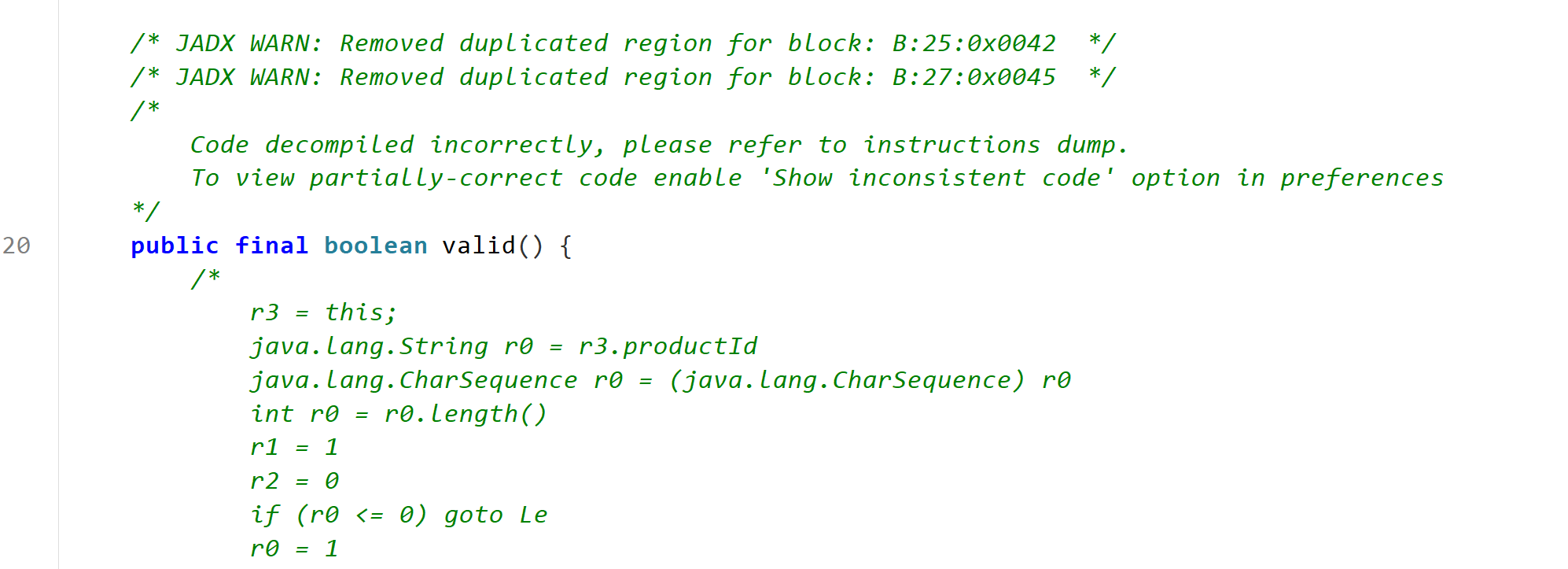
valid 有混淆
1 2 3 4 5 6 7 8 9 10 11 12 13 14 15 16 17 18 19 20 21 22 23 24 25 26 27 28 public final boolean valid() { // 检查productId不为空且长度>0 if (this.productId == null || this.productId.length() <= 0) { return false; } // 检查productSecret不为空且长度>0 if (this.productSecret == null || this.productSecret.length() <= 0) { return false; } // 检查appVersion不为空且长度>0 if (this.appVersion == null || this.appVersion.length() <= 0) { return false; } // 检查packageName不为空且长度>0 if (this.packageName == null || this.packageName.length() <= 0) { return false; } // 检查sn不为空且长度>0 if (this.sn == null || this.sn.length() <= 0) { return false; } return true; }
XiaoYaSDK 从XiaoYaSDK的代码中,我可以看到:
在init方法(第340行)中,创建了AuthManager实例:
1 XiaoYaSDK.f29134e = new AuthManager(config.getEnv(), false, 2, null);
在setAccessToken方法(第417行)中,调用了AuthManager的a方法(即setToken):
1 2 3 4 5 6 7 8 9 10 11 12 13 14 15 16 17 18 19 20 21 22 23 @JvmStatic public final void a (String str, String str2, IAuthTokenListener iAuthTokenListener) { AuthManager authManager = XiaoYaSDK.f29134e; if (authManager != null ) { authManager.a(iAuthTokenListener); } x xVar = null ; if (authManager != null ) { XiaoYaSDKConfig xiaoYaSDKConfig = XiaoYaSDK.f29135f; String appVersion = xiaoYaSDKConfig != null ? xiaoYaSDKConfig.getAppVersion() : null ; XiaoYaSDKConfig xiaoYaSDKConfig2 = XiaoYaSDK.f29135f; String sn = xiaoYaSDKConfig2 != null ? xiaoYaSDKConfig2.getSn() : null ; XiaoYaSDKConfig xiaoYaSDKConfig3 = XiaoYaSDK.f29135f; String productId = xiaoYaSDKConfig3 != null ? xiaoYaSDKConfig3.getProductId() : null ; XiaoYaSDKConfig xiaoYaSDKConfig4 = XiaoYaSDK.f29135f; authManager.a(appVersion, str, sn, productId, xiaoYaSDKConfig4 != null ? xiaoYaSDKConfig4.getProductSecret() : null , str2, "3" ); xVar = x.f115930a; } if (xVar == null ) { return ; } XiaoYaConnectionSDK.f26533a.a(authManager); }
这个方法从XiaoYaSDKConfig中获取各种配置参数,包括productSecret,然后调用AuthManager的a方法来创建MainAPPInfo。
1 2 3 public XiaoYaSDKConfig(String str, String str2, String str3, String str4, String str5, String str6, String str7, int i, String str8, String str9, int i2, boolean z, boolean z2, String str10, boolean z3, int i3, j jVar) { this (str, str2, str3, (i3 & 8 ) != 0 ? SDKConfig.cobp_prot7ecte1d : str4, str5, str6, str7, i, str8, str9, (i3 & 1024 ) != 0 ? 2 : i2, (i2 & 2048 ) != 0 ? false : z, (i2 & 4096 ) != 0 ? false : z2, str10, (i2 & 16384 ) != 0 ? false : z3); }
这里的关键是 (i3 & 8) != 0 ? SDKConfig.cobp_prot7ecte1d : str4,这意味着:
如果 (i3 & 8) != 0 为真,则使用 SDKConfig.cobp_prot7ecte1d 作为 productSecret
否则使用构造函数参数 str4 作为 productSecret
SDKConfig.cobp_prot7ecte1d 是一个被混淆保护的静态值,这很可能就是之前我们找到的 productSecret 的最终来源。
1 2 3 public XiaoYaConnectionConfig(String str, String str2, String str3, String str4, String str5, String str6, String str7, int i, String str8, String str9, Integer num, boolean z, boolean z2, String str10, boolean z3, int i2, j jVar) { this (str, str2, str3, (i2 & 8 ) != 0 ? SDKConfig.cobp_prot7ecte1d : str4, str5, str6, str7, i, str8, (i2 & 512 ) != 0 ? "" : str9, (i2 & 1024 ) != 0 ? 2 : num, (i2 & 2048 ) != 0 ? false : z, (i2 & 4096 ) != 0 ? false : z2, (i2 & 8192 ) != 0 ? "TEXT" : str10, (i2 & 16384 ) != 0 ? false : z3); }
这里的关键同样是 (i2 & 8) != 0 ? SDKConfig.cobp_prot7ecte1d : str4,这意味着:
如果 (i2 & 8) != 0 为真,则使用 SDKConfig.cobp_prot7ecte1d 作为 productSecret
否则使用构造函数参数 str4 作为 productSecret
在第114行有一个 convert2AppConfig() 方法,它将XiaoYaConnectionConfig转换为AppConfig:
1 2 3 4 5 6 7 8 9 10 11 12 13 14 15 16 public final AppConfig convert2AppConfig () { String str = this .productId; String str2 = str == null ? "" : str; String str3 = this .productSecret; String str4 = str3 == null ? "" : str3; String str5 = this .appVersion; String str6 = str5 == null ? "" : str5; String str7 = this .packageName; String str8 = this .sn; String str9 = str8 == null ? "" : str8; String str10 = this .osVersion; String str11 = str10 == null ? "" : str11; int i = this .env; String str12 = this .os; return new AppConfig (str2, str4, str6, str7, str9, str11, i, str12 == null ? "" : str12); }
这里将 this.productSecret 传递给了 AppConfig 的构造函数。
SDKConfig com.ccbsdk.contact.SDKConfig
1 2 3 4 5 6 7 8 9 10 11 12 13 14 15 16 17 18 19 20 21 22 23 24 25 26 27 28 29 30 31 32 33 34 35 36 37 38 39 40 41 42 43 44 45 46 47 48 49 50 public class SDKConfig { public static final String FACE_CLASS = "com.ccb.identityverify.controller.IdentityVerifyController" ; public static final String ZXBANK_FACE = "com.ccb.facelib.impl.FaceInterface" ; public static final String cobp_abstsefract = "action" ; public static final String cobp_boowrealean = "PdId" ; public static final String cobp_brecjak = "openWebView" ; public static String cobp_bygwswgte = null ; public static final String cobp_cacfhtch = "closeWebView" ; public static String cobp_chsawar = null ; public static final String cobp_clhfcass = "faceIdentify" ; public static final String cobp_contsetinue = "function" ; public static final String cobp_conxdsst = "faceIdentifyWithCstId" ; public static String cobp_csastje = "1" ; public static String cobp_d32of = null ; public static final String cobp_defawault = "ScnId" ; public static final String cobp_doawuble = "isCaptureContent" ; public static String cobp_elwesx = null ; public static final String cobp_extarwetends = "back_groundColor" ; public static final String cobp_fawinally = "Android-SDK-1.7.6" ; public static final String cobp_finazrfsl = "ccbFaceRecognition" ; public static final String cobp_flofesat = "getDeviceSecureState" ; public static String cobp_ftvfxor = null ; public static cobp_isfxdf cobp_gotadwo = null ; public static final String cobp_impodsrt = "readContacts" ; public static final String cobp_interrawface = "当前网络不可用" ; public static String cobp_invsvt = "" ; public static String cobp_isfxdf = null ; public static final String cobp_loaweng = "takePhoto" ; public static final String cobp_natzwfive = "isAppInstalled" ; public static String cobp_nseilw = null ; public static final String cobp_pacgdkage = "invoke" ; public static final String cobp_privaerhhte = "send" ; public static final String cobp_prot7ecte1d = "android" ; public static final String cobp_pubzwlic = "jumpToApp" ; public static final String cobp_retunyrn = "isGetDeviceInfo" ; public static final String cobp_stamktic = "allowList" ; public static final String cobp_stricfewfp = "eventID" ; public static final String cobp_suhrper = "useOtherSDK" ; public static final String cobp_swithrtch = "checkPermission" ; public static final String cobp_szfhort = "userData" ; public static String cobp_tberry = null ; public static final String cobp_thrtrows = "checkPermissionAll" ; public static final String cobp_thrzsaow = "NotifyFront" ; public static final String cobp_thwdais = "showToast" ; public static final String cobp_tr1ansien5t = "当前Android系统兼容性较差,可尝试使用系统相机拍照后选取相片/升级最新系统" ; public static final String cobp_voired = "getSDKVersion" ; public static final String cobp_volatiarwle = "param" ; public static final String cobp_whifwale = "setStatusBarColor" ; }
cobp_prot7ecte1d:用于API认证,作为productSecret的默认值cobp_fawinally:标识SDK版本,用于服务端识别客户端版本cobp_finazrfsl:区分不同功能模块(人脸识别)
风险
硬编码密钥 :cobp_prot7ecte1d = "android" 存在安全风险版本信息泄露 :SDK版本号可能被用于针对性攻击接口暴露 :大量接口常量可能被恶意利用
cobp_d32of com.ccbsdk.business.domain.cobp_d32of
数据封装 :用于封装复杂的业务数据结构序列化支持 :继承自cobp_isfxdf,支持DER/BER编码数据传输 :在H5和原生代码之间传递结构化数据
1 2 H5请求 → CloudObject.handler() → 使用SDKConfig常量解析 → 调用相应功能 → 返回cobp_d32of结构化响应
1 2 3 4 5 6 7 8 9 10 11 12 13 14 15 16 17 18 19 20 21 22 23 24 25 26 27 28 29 30 31 32 33 34 35 36 37 38 39 40 41 42 43 44 45 46 47 48 49 50 51 52 53 54 55 56 57 58 59 60 61 62 63 64 65 66 67 68 69 70 71 72 73 74 75 76 77 78 79 80 81 82 package com.ccbsdk.business.domain;public interface cobp_d32of { public static final String cobp_abstsefract = "SDK_Sgn" ; public static final String cobp_b1r4e2a6k0 = "000000" ; public static final String cobp_b1y0t2e5 = "Rooted" ; public static final String cobp_boowrealean = "Txn_ModDsc" ; public static final String cobp_brecjak = "Server Error" ; public static final String cobp_bygwswgte = "_RequestTime 耗时:" ; public static final String cobp_c0a4s77e8 = "Jailbreaked" ; public static final String cobp_c1a0tc0h9 = "OPN0100014" ; public static final String cobp_c1o5n7s3t0 = "SDK0100002" ; public static final String cobp_c4h0a11r7 = "Emulator" ; public static final String cobp_c5l0a6s9s = "SDK请求JSON构建失败" ; public static final String cobp_cacfhtch = "验证开发者成功" ; public static final String cobp_chsawar = "毫秒" ; public static final String cobp_clhfcass = "success" ; public static final String cobp_contsetinue = "Sgn" ; public static final String cobp_conxdsst = "ScrtData" ; public static final String cobp_csastje = "_RequestParams " ; public static final String cobp_d0o14 = "Data" ; public static final String cobp_d32of = "https://open.ccb.com" ; public static final String cobp_d7r6eou6b0le = "网络连接异常,请您稍后重试@#rspCodePlaceholder#@请检查商户端加签服务器网络联通性、服务是否启动,可在手机浏览器中访问加签服务器地址验证" ; public static final String cobp_defawault = "Txn_Rsp_Cd_Dsc" ; public static final String cobp_doawuble = "URLInfArry" ; public static final String cobp_e7l6s8e0 = "Txn_Rsp_Cd_Dsc" ; public static final String cobp_elwesx = "Cookie" ; public static final String cobp_extarwetends = "SYS_RESP_CODE" ; public static final String cobp_f0o71r8 = "CntrKey" ; public static final String cobp_f8l0o9a9t1 = "SDK0200010" ; public static final String cobp_f9i0n6a8l = "加签服务异常,请您稍后重试@SDK0200010@请检查商户端加签服务器配置的appkey、商户私钥或app端配置的appkey、商户公钥是否配置正确" ; public static final String cobp_fawinally = "SYS_RESP_DESC" ; public static final String cobp_finazrfsl = "ScrtSgn" ; public static final String cobp_flofesat = "ScrtKey" ; public static final String cobp_ftvfxor = "utf-8" ; public static final String cobp_g3o0t6o9 = "Txn_Rsp_Inf" ; public static final String cobp_gotadwo = "TLS" ; public static final String cobp_i06f29 = "Url" ; public static final String cobp_i0n39t7 = "SyncKey" ; public static final String cobp_i2mple4ments = "Sys_Evt_Trace_Id" ; public static final String cobp_i4m55po0r9t1 = "@请检查手机和开放平台网关网络联通性,或开放平台网关URL是否正确" ; public static final String cobp_impodsrt = "Eqmt_ID_No" ; public static final String cobp_instanceof = "Mrch_ID" ; public static final String cobp_interrawface = "Rsp_Dt" ; public static final String cobp_invsvt = "_RequestUrl " ; public static final String cobp_isfxdf = "https://open.ccb.cn" ; public static final String cobp_l9o0n9g3 = "000000000000" ; public static final String cobp_loaweng = "set-cookie" ; public static final String cobp_n2a7t0i2v7e = "人脸SDK调用异常" ; public static final String cobp_n8e40w9 = "custToken" ; public static final String cobp_natzwfive = "SYS_REQ_TIME" ; public static final String cobp_nseilw = "_ResponseCode " ; public static final String cobp_p0u8b0l7i0c = "SDK100000" ; public static final String cobp_pacgdkage = "Txn_Rsp_Inf" ; public static final String cobp_privaerhhte = "SDK_VNo" ; public static final String cobp_prot7ecte1d = "Rsp_Tm" ; public static final String cobp_pubzwlic = "MAC_Adr" ; public static final String cobp_r7e0t5u2r0n1 = "SDK0100004" ; public static final String cobp_retunyrn = "IP_Adr" ; public static final String cobp_s0u66pe1r7 = "SDK0200011" ; public static final String cobp_s2ynr3onize6d = "Head" ; public static final String cobp_s4h33o0rt1 = "SDK验签失败" ; public static final String cobp_stamktic = "Apl_Nm" ; public static final String cobp_stricfewfp = "Rqs_Dt" ; public static final String cobp_suhrper = "APP_Key" ; public static final String cobp_swithrtch = "APP_VNo" ; public static final String cobp_szfhort = "APPID" ; public static final String cobp_t6h6r0o8w7 = "SDK0000008" ; public static final String cobp_t7h0i44s9 = "SDK0400001" ; public static final String cobp_t9r0y01 = "Extra" ; public static final String cobp_tberry = "_ResponseBody " ; public static final String cobp_thrtrows = "APP_Sgn" ; public static final String cobp_thrzsaow = "Rndm_Num" ; public static final String cobp_thwdais = "Redirection" ; public static final String cobp_tr1ansien5t = "Rqs_Jrnl_No" ; public static final String cobp_v1oi0d6 = "OPN0100003" ; public static final String cobp_voired = "Client Error" ; public static final String cobp_volatiarwle = "Rqs_Tm" ; public static final String cobp_w5h66i9l0e8 = "SDK0000009" ; public static final String cobp_whifwale = "APP_Token" ; }
H5 作为 H5 页面与原生 Android 代码之间的桥梁和交互处理器 。
接收 H5 页面发送的请求
解析并调用相应的原生功能
将执行结果返回给 H5 页面
WebView 交互管理
1 2 3 this .webView.cobp_d32of(SDKConfig.cobp_pacgdkage, this ); this .webView.cobp_d32of(SDKConfig.cobp_privaerhhte, this );
人脸识别功能
1 2 3 4 5 6 7 8 if (strCobp_whifwale.equals(SDKConfig.cobp_clhfcass) || strCobp_whifwale.equals(SDKConfig.cobp_conxdsst)) { IdentityVerifyController identityVerifyController = IdentityVerifyController.getInstance(faceData.getApplication(), faceData.getFaceSDK_appSecretS()); }
设备安全检测
1 2 3 4 5 if (strCobp_whifwale.equals(SDKConfig.cobp_flofesat)) { cobp_nseilwVar6.put("isRooted" , checkRoot()); cobp_nseilwVar6.put("isEmulator" , checkEmulator()); }
权限管理
1 2 3 4 5 6 7 8 9 10 if (strCobp_whifwale.equals(SDKConfig.cobp_swithrtch)) { String permission = cobp_nseilwVarCobp_ftvfxor.cobp_whifwale("param" ); cobp_nseilwVar2.put("isPermitted" , checkPermissionState(context, permission)); } if (strCobp_whifwale.equals(SDKConfig.cobp_thrtrows)) { List<String> permissions = cobp_nseilwVarCobp_ftvfxor.cobp_conxdsst("param" ); cobp_nseilwVar2.put("isPermitted" , checkPermissionState(context, permissions)); }
多媒体功能
1 2 3 4 5 6 7 8 9 10 11 12 if (strCobp_whifwale.equals(SDKConfig.cobp_loaweng)) { mImgSize = Integer.parseInt(strCobp_whifwale8); ((BaseWebViewActivity) context4).cobp_d32of(context4, SDKConfig.cobp_loaweng, 200 , ...); } if (strCobp_whifwale.equals(SDKConfig.cobp_thwdais)) { String msg = cobp_nseilwVarCobp_ftvfxor.cobp_whifwale("msg" ); showToast(context, msg); }
应用间通信
1 2 3 4 5 6 if (strCobp_whifwale.equals(SDKConfig.cobp_pubzwlic)) { String urlSchema = cobp_nseilwVarCobp_ftvfxor.cobp_finazrfsl("param" ).cobp_whifwale("urlSchema" ); Intent intent = new Intent ("android.intent.action.VIEW" , Uri.parse(urlSchema)); context.startActivity(intent); }
调用接口
接口常量
功能描述
参数示例
cobp_clhfcass人脸识别
{"param": {...}}
cobp_flofesat设备安全检测
无参数
cobp_swithrtch单权限检查
{"param": "android.permission.CAMERA"}
cobp_thrtrows多权限检查
{"param": ["permission1", "permission2"]}
cobp_loaweng拍照
{"param": {"compressedSize": 2048}}
cobp_thwdais显示 Toast
{"param": {"msg": "提示信息"}}
cobp_whifwale设置状态栏颜色
{"param": {"hexColor": "#FF0000"}}
cobp_pubzwlic应用跳转
{"param": {"urlSchema": "app://xxx"}}
cobp_impodsrt联系人导入
无参数
cobp_voired获取版本信息
无参数
cobp_brecjak打开 WebView
{"param": {...}}
cobp_cacfhtch关闭 WebView
{"param": {...}}
cn.jpush.android.webview.bridge.d JavaScript接口身份伪造
1 2 3 4 5 @JavascriptInterface public void startActivityByName (String str, String str2) { Intent intent = new Intent (context, Class.forName(str)); }
恶意网页可伪造Activity名称启动任意组件
无权限检查
Intent劫持
1 2 3 4 5 6 @JavascriptInterface public void startActivityByIntent (String str, String str2) { Intent intent = new Intent (str); intent.putExtra(JPushInterface.EXTRA_EXTRA, str2); context.startActivity(intent); }
直接解析并使用参数,无完整性校验 H5可篡改点击数据
1 2 3 4 5 6 7 8 9 10 @JavascriptInterface public void inAppClick (String str) { try { JSONObject jSONObject = new JSONObject (str); Logger.d("WebViewHelper" , "h5 click, actionType: " + jSONObject.optInt("actionType" ) + ", actionKey: " + jSONObject.optString("param" ) + ", param: " + str); cn.jpush.android.o.a.a().d(JPushConstants.mApplicationContext, this .f4628b); } catch (Throwable th) { Logger.w("WebViewHelper" , "h5 click failed, " + th.getMessage()); } }
缺乏参数验证,布尔参数可被任意注入
1 2 3 4 5 6 7 8 9 10 11 12 13 14 15 16 @JavascriptInterface public void click (String str, String str2, String str3) { Logger.d("WebViewHelper" , "Web callback:click - actionId:" + str + ", shouldClose:" + str2 + ", shouldCancelNotification:" + str3); try { a(str); boolean z = Boolean.parseBoolean(str2); if (Boolean.parseBoolean(str3)) { cn.jpush.android.x.b.c(JPushConstants.mApplicationContext, this .f4628b); } if (!z || this .f4627a.get() == null ) { return ; } this .f4627a.get().finish(); } catch (Throwable unused) { } }
GenAuthnHelper类功能分析 核心功能
单例模式管理 - 提供全局认证助手实例登录认证 - loginAuth() 方法处理用户登录手机认证 - mobileAuth() 方法处理手机号认证手机信息获取 - getPhoneInfo() 方法获取手机相关信息授权页面管理 - 启动和控制授权页面主题配置 - 自定义认证界面样式回调处理 - 处理认证结果和页面交互
STRIDE安全风险分析 🔴 Spoofing(身份伪造)风险 单例模式劫持
1 private static GenAuthnHelper f8644f;
风险描述 :单例实例可能被恶意代码劫持和替换
攻击场景 :
1 2 3 4 Field instanceField = GenAuthnHelper.class.getDeclaredField("f8644f" );instanceField.setAccessible(true ); instanceField.set(null , maliciousInstance);
回调伪造
1 2 3 4 5 6 public void loginPageInCallBack (String str, JSONObject jSONObject) { GenLoginPageInListener genLoginPageInListener = this .h; if (genLoginPageInListener != null ) { genLoginPageInListener.onLoginPageInComplete(str, jSONObject); } }
风险描述 :回调监听器可能被恶意实现,伪造认证结果
🟡 Tampering(数据篡改)风险 参数篡改
1 2 3 4 public void loginAuth (final String str, final String str2, final GenTokenListener genTokenListener, int i) { final com.cmic.gen.sdk.a aVarA = a(genTokenListener); aVarA.a("SDKRequestCode" , i); }
风险描述 :传入的认证参数可能在处理过程中被篡改
线程安全问题
1 2 3 4 5 6 7 n.a(new n .a(this .f8653b, aVarA) { protected void a () { if (GenAuthnHelper.this .a(aVarA, str, str2, "loginAuth" , 3 , genTokenListener)) { } } });
风险描述 :多线程环境下可能导致竞态条件
🟠 Repudiation(抵赖)风险 缺乏审计日志
1 2 3 4 5 public void a (com.cmic.gen.sdk.a aVar) { final c.a aVar2 = new c .a(aVar); this .f8655d.postDelayed(aVar2, this .f8654c); }
风险描述 :认证操作缺乏完整的审计跟踪,无法追溯责任
错误处理不记录
1 2 3 4 5 6 7 8 public void quitAuthActivity () { try { } catch (Exception e2) { e2.printStackTrace(); com.cmic.gen.sdk.e.c.a("AuthnHelper" , "关闭授权页失败" ); } }
敏感信息泄露
1 2 3 4 String strA = h.a(GenAuthnHelper.this .f8653b);if (!TextUtils.isEmpty(strA)) { aVarA.a("phonescrip" , strA); }
风险描述 :手机脚本信息可能包含用户隐私数据
异常信息泄露
1 2 3 4 catch (Exception e2) { e2.printStackTrace(); com.cmic.gen.sdk.e.c.a("AuthnHelper" , "关闭授权页失败" ); }
调试信息泄露
1 com.cmic.gen.sdk.e.c.b("onBusinessComplete" , "onBusinessComplete" );
🟣 Denial of Service(拒绝服务)风险 超时处理不当
1 this .f8655d.postDelayed(aVar2, this .f8654c);
风险描述 :延迟执行机制可能被用于资源耗尽攻击
线程池资源管理
1 2 3 4 5 n.a(new n .a(this .f8653b, aVarA) { protected void a () { } });
风险描述 :大量并发认证请求可能导致线程池资源耗尽
🟤 Elevation of Privilege(权限提升)风险 权限检查缺失
1 2 3 public static void b (Context context, com.cmic.gen.sdk.a aVar) { CMHookBridge.startActivity(aVar); }
风险描述 :直接启动Activity可能绕过正常的权限验证
配置权限管理
1 2 3 public void setAuthThemeConfig (GenAuthThemeConfig genAuthThemeConfig) { this .g = genAuthThemeConfig; }
风险检测收集 位置:com.ximalaya.ting.android.xmriskdatacollector.e.m.b()
1 2 3 4 5 6 7 8 9 10 11 12 13 14 15 16 17 18 19 20 21 22 23 24 25 26 27 28 29 30 31 32 33 34 35 public static final String[] f112274a = { AdSystemUtils.DEBUGGABLE, "ro.serialno" , "ro.boot.serialno" , "ro.boot.hardware" , "ro.product.device" , "ro.build.tags" , "ro.build.date.utc" , "gsm.network.type" , "gsm.sim.state" , "persist.sys.country" , "persist.sys.language" , "sys.usb.state" , "net.dns1" , "net.hostname" , "net.eth0.gw" , "net.gprs.local-ip" , AdSystemUtils.HTTP_PROXY, "http.agent" }; public static Map<String, String> b (com.ximalaya.ting.android.xmriskdatacollector.b bVar) { for (String str : t.f112274a) { map.put(str.replaceAll("\\." , XmLifecycleConstants.SPLIT_CHAR), t.a(str, "unkown" )); } return map; }
安装注册风险检测 位置 :com.ximalaya.ting.android.adsdk.download.receiver.XmInstallApkManager.registeredEnable()
1 2 3 4 5 6 7 8 9 10 11 12 13 14 15 16 17 18 19 20 21 22 23 24 25 26 public boolean registeredEnable () { boolean zIsDebuggable = AdSystemUtils.isDebuggable(); boolean zCheckRoot = AdPhoneData.checkRoot(XmAdSDK.getContext()); boolean zIsWifiProxy = AdNetworkUtils.isWifiProxy(); boolean zIsHooked = AdHookUtils.isHooked(); boolean zCheckXposed = AdXposedUtils.checkXposed(); boolean zHasSubstrateOrXposed = AdHookUtils.hasSubstrateOrXposed(); boolean zIsEmulator = AdEmulatorUtil.isEmulator(); boolean zIsDevelopmentSettingsEnabled = AdPhoneData.isDevelopmentSettingsEnabled(); boolean zIsADBConnectionEnabled = AdPhoneData.isADBConnectionEnabled(); boolean z = zCheckRoot || zIsWifiProxy || zIsDebuggable || zIsHooked || zCheckXposed || zHasSubstrateOrXposed || zIsEmulator || zIsDevelopmentSettingsEnabled; RiskDataTraceManager.traceRiskData(zCheckRoot, zIsWifiProxy, zIsDebuggable, zIsHooked, zCheckXposed, zHasSubstrateOrXposed, zIsEmulator, zIsDevelopmentSettingsEnabled, zIsADBConnectionEnabled); return !z; }
registeredEnable() 检查多个安全指标:
Root检测
代理检测
调试器检测
Xposed/Substrate检测
模拟器检测
开发者选项检测
ADB连接检测
风险数据收集上报 风险上报逻辑
1 2 3 4 5 6 7 8 9 10 t.f112274a (系统属性键数组) ↓ m.b() (收集系统属性到Map) ↓ m.a() (将Map转换为JSON格式) ↓ k.a() (发送网络请求) ↓ 服务器接收风险数据
com.ximalaya.ting.android.xmriskdatacollector.e.m.b()
1 2 3 for (String str : t.f112274a) { map.put(str.replaceAll("\\." , XmLifecycleConstants.SPLIT_CHAR), t.a(str, "unkown" )); }
1 2 3 4 5 6 7 8 9 10 11 12 13 public static void b (com.ximalaya.ting.android.xmriskdatacollector.b bVar, boolean z) { Map<String, String> mapB = m.b(bVar); String strA = m.a(bVar, mapB, false ); if (k.a(strA, bVar)) { m.g(); m.c(string); } else { b().h.a(e.a(strA), "" ); } }
ro.debuggable
com.ximalaya.ting.android.adsdk.base.util.AdSystemUtils
1 2 3 4 5 6 public class AdSystemUtils { public static final String DEBUGGABLE = "ro.debuggable" ; ... public static boolean isDebuggable () { return "1" .equals(getSystemProperty(DEBUGGABLE, "unknown" )); }
com.ximalaya.ting.android.xmriskdatacollector.e.t
1 public static final String[] f112274a = {AdSystemUtils.DEBUGGABLE, "ro.serialno" , "ro.boot.serialno" , "ro.boot.hardware" , "ro.product.device" , "ro.build.tags" , "ro.build.date.utc" , "gsm.network.type" , "gsm.sim.state" , "persist.sys.country" , "persist.sys.language" , "sys.usb.state" , "net.dns1" , "net.hostname" , "net.eth0.gw" , "net.gprs.local-ip" , AdSystemUtils.HTTP_PROXY, "http.agent" };
com.ximalaya.ting.android.xmriskdatacollector.e.m
1 2 3 for (String str : t.f112274a) { map.put(str.replaceAll("\\." , XmLifecycleConstants.SPLIT_CHAR), t.a(str, "unkown" )); }
用途
1 isDebuggable() → t.a("ro.debuggable") → m.b()收集 → 上传服务器
第三方组件 Bugly(腾讯崩溃收集 SDK) libBugly_Naive.so
然后就是它用了很多第三方组件。像这个腾讯的bugly,就是检测crash的。你们看native直接找JNI_OnLoad就行了。没混淆的话这个就是入口。
入口:JNI_OnLoad 调用关系:
1 2 3 4 5 6 7 8 9 10 11 12 13 14 15 16 17 18 19 20 21 22 23 24 25 JNI_OnLoad ├── GetEnv(JNI_VERSION_1_6) ---------------+ │ | ├── backupJavaClasses(env) | │ └── 缓存 jclass 引用 | │ | ├── getBuglyClassPathPrefix(env) | │ └── 返回 "com/tencent/bugly/" 前缀 | │ | ├── 缓存 3 个 Java 类(只缓存一次) | │ ├─ NativeCrashHandler (jc_NativeCrashHandler) ─┐ │ ├─ NativeExceptionHandler (jc_NativeExceptionHandler) │ │ └─ 对应方法 ID(jm_*) │ │ │ ├── 注册 3 组 native 方法(RegisterNatives)-------------┘ │ ├─ NativeCrashHandler 3 个 │ │ ├─ appendNativeLog │ │ ├─ putNativeKeyValue │ │ └─ setNativeInfo │ ├─ getSoCpuAbi │ └─ NativeExceptionHandler 2 个 │ ├─ handleNativeException │ └─ handleNativeException2 │ └── 返回 JNI_VERSION_1_6 (65542)
数据结构
1 2 3 4 5 6 7 8 9 | 变量名 | 类型 | 作用 | | --------------------------- | ----------- | -------------------------------- | | `jc_NativeCrashHandler` | `jclass` | NativeCrashHandler 类引用 | | `jc_NativeExceptionHandler` | `jclass` | NativeExceptionHandler 类引用 | | `jm_getInstance` | `jmethodID` | NativeCrashHandler.getInstance() | | `jm_getMHandle` | `jmethodID` | getNativeExceptionHandler() | | `jm_handleNativeException` | `jmethodID` | 处理 native 崩溃(旧接口) | | `jm_handleNativeException2` | `jmethodID` | 处理 native 崩溃(新接口) | | `jm_getAndUpdateAnrState` | `jmethodID` | 获取并更新 ANR 状态 |
crash时调用链
1 2 3 4 5 6 7 8 9 10 11 (signal handler) ↓ bugly_signal_handler() [libbugly.so] ↓ -> 构造 crash 信息结构体 ↓ CallStaticObjectMethod(jc_NativeCrashHandler, jm_getInstance) ↓ CallVoidMethod(jc_NativeExceptionHandler, jm_handleNativeException2, ...) ↓ Java 层上报到服务器